
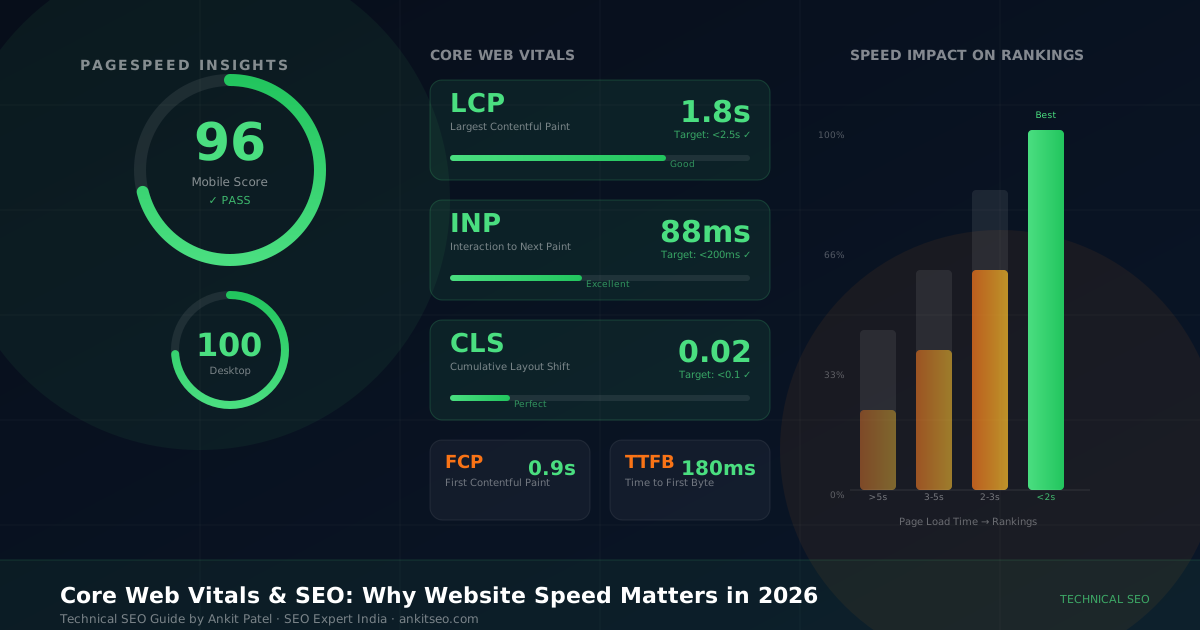
A few years ago, a client came to me frustrated. Their website looked great, their content was solid, and they'd invested in decent backlinks — yet a competitor with visibly worse content kept outranking them for every term that mattered. When I ran a technical audit, the problem was immediately clear: their Core Web Vitals scores were failing on mobile. Their LCP was 6.8 seconds. Their CLS was 0.43. Real users were bouncing before the page had even finished loading.
We spent six weeks fixing the performance issues. Within three months, the organic traffic chart changed direction. Within six months, they'd reclaimed the rankings they'd been chasing for over a year.
Speed is not a nice-to-have. In 2026, with Google's Page Experience signals fully embedded in ranking systems and users expecting pages to load in under two seconds, a slow website is a business liability. This guide will explain exactly what Core Web Vitals are, why they matter, and — most importantly — what to do about them.
What the three Core Web Vitals measure and their 2026 benchmarks · Why speed affects both rankings and revenue · The most common causes of poor scores · A complete optimization checklist · Platform-specific advice for WordPress and Shopify · A real case study with before/after metrics · 15 mistakes to avoid
What Are Core Web Vitals?
Core Web Vitals are a set of three specific metrics that Google uses to measure the real-world user experience of loading a webpage. Announced in 2020 and integrated as ranking signals in 2021, they represent Google's most concrete attempt to quantify something that had always been subjective: how does it actually feel to use this page?
The three metrics are:
- LCP (Largest Contentful Paint): How fast the main content loads
- INP (Interaction to Next Paint): How quickly the page responds to user input
- CLS (Cumulative Layout Shift): How stable the layout is while loading
Each metric targets a distinct aspect of page experience — loading, interactivity, and visual stability. Together, they give Google (and you) a multi-dimensional view of how users actually experience your website, not just how fast a file downloads.
They sit within a broader set of Page Experience signals that also includes HTTPS security, mobile-friendliness, and absence of intrusive interstitials (full-screen pop-ups that block content). But the Core Web Vitals are the most technically demanding — and the most impactful to optimize.
Core Web Vitals are measured from real user data (Chrome User Experience Report — CrUX), not simulated tests. Your PageSpeed Insights "lab score" and your actual field data score can differ significantly. Google's ranking algorithm uses field data.
The Three Core Web Vitals Explained
Largest Contentful Paint (LCP)
LoadingLCP measures how long it takes for the largest visible content element on the page to fully render within the viewport. In most cases, this is your hero image, a large heading, or a video thumbnail — whatever is the dominant element a user sees first when the page loads.
Think of it this way: LCP answers the question "When does the user feel like the page has actually loaded something useful?" A blank screen for four seconds feels broken, even if the full page eventually loads correctly.
Common Causes of Poor LCP
- Large, uncompressed hero images (especially PNG or unoptimized JPEG)
- Hero image not being preloaded — browser discovers it late in the loading process
- Render-blocking JavaScript or CSS that delays content from painting
- Slow server response time (TTFB over 600ms)
- No CDN — users far from your server wait longer for every asset
- LCP element loaded via CSS background-image (not preloadable by the browser)
How to Fix LCP
- Convert hero images to WebP or AVIF format — typically 30–50% smaller than JPEG
- Add
<link rel="preload" as="image">for your LCP element - Eliminate or defer render-blocking scripts with
asyncordeferattributes - Upgrade to quality hosting with sub-200ms TTFB — or add a CDN
- Set
fetchpriority="high"on the LCP image element
Interaction to Next Paint (INP)
InteractivityINP replaced First Input Delay (FID) as a Core Web Vital in March 2024. Where FID only measured the delay before the browser could begin processing the first interaction, INP measures the full response time for all interactions — clicks, taps, keyboard inputs — throughout the entire page session.
Real-world example: You're on a product page and tap "Add to Cart." INP measures how long it takes from that tap until the visual feedback (the button changing state, the cart count updating) appears on screen. If your site is running heavy JavaScript that blocks the main thread, that delay can be frustratingly long — even if the page loaded fast.
Common INP Issues
- Heavy JavaScript executing on the main thread and blocking interaction processing
- Long tasks (JavaScript tasks taking over 50ms) that delay the browser's response
- Excessive event listeners responding to every scroll or input event without debouncing
- Third-party scripts (chat widgets, analytics, ad networks) consuming main thread time
- Poorly optimized React, Vue, or Angular components with inefficient re-rendering
How to Improve INP
- Break up long JavaScript tasks using
scheduler.yield()orsetTimeoutchunking - Audit and defer or remove non-essential third-party scripts
- Use web workers to offload heavy computation off the main thread
- Debounce scroll and input event handlers to reduce processing frequency
- Use the Chrome DevTools Performance panel to identify the specific long tasks causing delays
- Optimize framework-specific rendering — minimize unnecessary state updates in React/Vue
Cumulative Layout Shift (CLS)
Visual StabilityCLS measures how much visible content unexpectedly moves position while the page is loading. It's scored as a number between 0 and any positive value — the lower the better. A CLS of 0 means nothing moved. A CLS of 0.5 means significant instability.
You've experienced CLS yourself: you're reading an article, about to tap a link, and suddenly an ad loads above it and pushes everything down — and you end up clicking the wrong thing. Or you're filling in a form and the submit button jumps right as you tap it. That's CLS, and it's genuinely infuriating.
What Causes CLS
- Images and videos without explicit
widthandheightattributes — the browser doesn't reserve space - Ads, embeds, or iframes injected into content areas without reserved space
- Web fonts loading late and causing text to reflow (FOUT — Flash of Unstyled Text)
- Dynamically injected content (cookie banners, notification bars) pushing page content down
- Animations that trigger layout recalculations rather than using CSS transform
How to Fix CLS
- Always set explicit
widthandheighton every<img>and<video>element - Reserve space for ad slots with
min-heighton their containers - Use
font-display: optionalorfont-display: swapwith a closely matched fallback font - Use CSS
aspect-ratioproperty for responsive embedded media - Avoid inserting content above existing content after page load — place dynamic elements at the bottom
Core Web Vitals Benchmarks in 2026
| Metric | What It Measures | Good ✓ | Needs Improvement | Poor ✗ |
|---|---|---|---|---|
| LCP | Loading — time until largest visible element renders | ≤ 2.5s | 2.5s – 4.0s | > 4.0s |
| INP | Interactivity — response delay to user input | ≤ 200ms | 200ms – 500ms | > 500ms |
| CLS | Visual Stability — unexpected layout movement | ≤ 0.1 | 0.1 – 0.25 | > 0.25 |
| TTFB* | Time to First Byte — server response speed | ≤ 800ms | 800ms – 1.8s | > 1.8s |
*TTFB is not a Core Web Vital but is a key supporting metric that directly impacts LCP. Target under 200ms for optimal performance.
Why Core Web Vitals Matter for SEO
The honest answer is: Core Web Vitals matter for SEO in two distinct ways, and conflating them leads to unrealistic expectations on both sides.
The Direct Impact: Page Experience Signal
Google confirmed Core Web Vitals as ranking signals. Pages that pass all three thresholds get a Page Experience signal boost relative to pages that fail. However, Google has been explicit that content quality and relevance outweigh page experience for most queries. A slow page with excellent content will still outrank a fast page with thin content.
Where Core Web Vitals become decisive is in competitive situations — where two pages are comparable in content quality and authority. In those tiebreaker scenarios, the faster, more stable page wins.
The Indirect Impact: Engagement and Bounce Rates
This is where performance has its biggest real-world SEO impact, and it's much more significant than the direct signal. When your page loads slowly or jumps around during loading, users abandon it — and Google observes that behaviour.
- Pages with poor LCP see significantly higher bounce rates — users don't wait for slow content to appear
- High CLS causes accidental clicks and user frustration, driving users back to search results
- Poor INP on interactive pages (forms, e-commerce, SaaS tools) makes users feel the site is broken
All of these negative engagement signals are observed by Google through Chrome usage data. They create a feedback loop: poor performance → high abandonment → lower engagement signals → lower rankings → less traffic → fewer opportunities to improve. The inverse is equally true.
How Google Uses Core Web Vitals in Rankings
Let me be direct about something that many SEO articles overstate: Core Web Vitals alone will not make a mediocre page outrank excellent content. Google has said this explicitly, and it's consistent with what we observe in practice.
What Google is doing is using Core Web Vitals as a refinement layer on top of its primary ranking systems. The content relevance system, the quality system, the link authority system — those decide which pages are in contention for a given query. Core Web Vitals then help determine the ordering within that contention set.
Think of it as a hotel review system. Content quality and backlinks are like the star rating and guest reviews — they determine which hotels make the shortlist. Core Web Vitals are like cleanliness scores — they differentiate between the shortlisted options.
Improving your Core Web Vitals scores from "poor" to "good" will not automatically move you from page three to page one. It will, however, eliminate a technical handicap, improve your engagement metrics, and boost conversion rates — all of which contribute to ranking improvements over time. Fix performance as part of a complete SEO strategy, not instead of one.
Common Causes of Poor Core Web Vitals
Most websites fail their Core Web Vitals scores for predictable, fixable reasons. Here are the most common culprits I encounter in technical audits:
- Unoptimized Images: The single most common LCP killer. A 3MB hero image served as PNG, with no compression, on a mobile connection, will fail LCP every time. Switch to WebP/AVIF, compress aggressively, and add proper dimensions.
- Heavy JavaScript Bundles: Large, unoptimized JS bundles block the main thread, delay rendering, and destroy INP. Every 100KB of unminified JavaScript adds roughly 1 second of parse time on mid-range mobile devices.
- Excessive CSS: Render-blocking stylesheets that must be fully downloaded and parsed before anything can paint. Unused CSS adds unnecessary weight.
- Slow Hosting: Shared hosting with TTFB over 1 second is starting on the back foot for every single page. No amount of front-end optimization fully compensates for a slow server.
- Third-Party Scripts: Google Tag Manager containers loading 15+ tags, chat widgets, heatmap trackers, affiliate scripts — each one adds network requests, JavaScript execution time, and main thread contention.
- Ad Network Code: Programmatic ad scripts are among the worst offenders for both LCP and INP. They inject content dynamically (causing CLS), execute heavy JavaScript (damaging INP), and load asynchronously in ways that can delay the LCP element.
- Tracking Pixels: Facebook Pixel, Google Ads conversion tags, LinkedIn Insight — each adds JavaScript execution. With GTM, it's easy to accumulate 20+ tracking scripts without realizing it.
- Poor Theme Design: Especially on WordPress. Themes that load 15 font variations, import 8 separate CSS files, and embed jQuery UI for a simple dropdown are unfortunately common.
- Plugin Bloat (WordPress): Each active plugin potentially adds CSS and JavaScript to every page, even when that functionality isn't needed on that page.
- Render-Blocking Resources: Scripts loaded in
<head>withoutasyncordeferblock all rendering until they fully download and execute.
How to Measure Your Core Web Vitals
Before optimizing, you need accurate data. These are the tools I use in every technical SEO audit:
Google Search Console
The Core Web Vitals report shows real user data segmented by mobile/desktop and URL groups. This is your most important dashboard — it shows what Google actually measures.
PageSpeed Insights
At pagespeed.web.dev — shows both lab simulation (Lighthouse) and real CrUX field data for any URL. Use field data for ranking impact assessment; lab data for diagnosing issues.
Chrome DevTools
The Performance tab and Lighthouse audit panel. For diagnosing exactly which JavaScript tasks are causing INP issues and which resources are blocking LCP.
CrUX Dashboard
The Chrome User Experience Report via Google Data Studio. Useful for tracking Core Web Vitals trends over time and comparing against competitors at the origin level.
Lighthouse CI
Run Lighthouse automatically on every code deployment to catch performance regressions before they reach production. Essential for development teams.
web-vitals JS Library
Google's open-source library for measuring Core Web Vitals in your own analytics. Sends real user measurements to GA4 for page-level performance tracking.
Core Web Vitals Optimization Checklist
Image Optimization
- Convert all images to WebP — typically 25–35% smaller than JPEG with equivalent quality. Use AVIF for even better compression where browser support allows.
- Set explicit width and height on all img elements — prevents CLS by allowing browsers to reserve layout space before the image loads.
- Add fetchpriority="high" to your LCP image — tells the browser to prioritize downloading this resource above others.
- Implement lazy loading for below-fold images — use
loading="lazy"on all images except the LCP element (never lazy load the LCP image). - Use srcset and sizes for responsive images — serves appropriately sized images for each viewport rather than scaling down a 2000px image on mobile.
- Compress images before upload — even WebP images should be run through Squoosh or similar to eliminate metadata and reduce file size further.
Code Optimization
- Minify all CSS, JavaScript, and HTML — removes comments, whitespace, and redundant characters. Modern build tools (Webpack, Vite) do this automatically.
- Enable Brotli or Gzip compression on your server — reduces text file transfer sizes by 60–80%. Most modern hosts support Brotli; check your server headers.
- Remove unused CSS using tools like PurgeCSS or Chrome DevTools Coverage tab — large frameworks like Bootstrap load hundreds of unused rules.
- Code-split JavaScript bundles — only load the JavaScript needed for each specific page, not the entire application bundle.
- Defer or async non-critical JavaScript — move render-blocking scripts out of
<head>and adddeferattribute to prevent blocking the initial page render. - Preload critical resources — use
<link rel="preload">for LCP images, critical fonts, and key stylesheets to start downloading them earlier.
Server Optimization
- Implement a CDN (Content Delivery Network) — serves static assets from servers geographically close to each user. Cloudflare's free tier is a solid starting point for most sites.
- Enable browser caching with long cache TTLs — returning visitors load assets from local cache rather than re-downloading them. Set cache-control headers appropriately.
- Upgrade hosting for better TTFB — target TTFB under 200ms. If your server is consistently above 600ms, hosting is your biggest bottleneck.
- Enable HTTP/2 or HTTP/3 — allows multiple resources to load over a single connection simultaneously, reducing request overhead significantly.
- Use server-side rendering (SSR) for JavaScript-heavy applications — sends pre-rendered HTML rather than requiring the browser to build the page via JavaScript.
Mobile Optimization
- Test on real mid-range Android devices — don't only test on the latest flagship phone. Your users have a range of devices, and Google simulates a mid-range mobile for lab scores.
- Use system fonts or a single font family — every custom font is an additional network request. Add
font-display: swapto prevent render blocking. - Ensure all touch targets are at least 48×48px — small buttons and links cause accidental taps and increase frustration on mobile.
- Eliminate horizontal scrolling — pinching and zooming on mobile is a user experience failure. All content must fit within the viewport width.
- Remove intrusive interstitials on mobile — full-screen pop-ups before content loads are both a Page Experience negative signal and universally hated by users.
WordPress Core Web Vitals Optimization
WordPress powers over 43% of the web, and it's also responsible for a disproportionate share of poor Core Web Vitals scores I encounter in audits. The combination of plugin bloat, poorly-coded themes, and unoptimized databases creates performance challenges that require deliberate attention.
Here are the highest-impact WordPress-specific optimizations:
Choose a Lightweight Theme
Your theme is the foundation everything else is built on. Bloated multipurpose themes load 20+ scripts and stylesheets by default. Prefer minimal themes like GeneratePress, Astra, or Kadence — they're built specifically for performance and can achieve sub-1-second LCP when properly configured.
Essential Performance Plugins
- WP Rocket — the gold standard for WordPress caching, minification, and lazy loading. Handles most optimization tasks without manual configuration.
- Perfmatters — script manager that disables unnecessary CSS/JS on pages where it isn't needed. Reduces per-page payload dramatically.
- Imagify or ShortPixel — automatic image compression and WebP conversion on upload. Retroactively processes existing images.
- Cloudflare — free CDN, caching, and performance layer. Significantly improves TTFB and reduces server load.
Database and Hosting
Clean your WordPress database regularly — post revisions, transients, and spam comments accumulate over years and slow query times. Use a plugin like WP-Optimize. And if you're on shared hosting with consistent TTFB above 600ms, migrating to managed WordPress hosting (Kinsta, WP Engine, Cloudways) is often the single biggest performance improvement available.
If you're running a WordPress site and struggling with Core Web Vitals, our WordPress SEO service includes a full technical audit and performance optimization as part of the initial engagement.
Shopify Core Web Vitals Optimization
Shopify has a more controlled environment than WordPress — you can't install arbitrary server-side software — but that doesn't mean Core Web Vitals aren't a significant challenge for Shopify stores, especially those that have grown organically and accumulated apps over time.
Apps Are the Biggest Culprit
Every Shopify app that loads front-end scripts adds JavaScript to your storefront. A store with 20+ apps installed is frequently loading 15+ third-party scripts on every page — review widgets, size guides, currency converters, loyalty programs, upsell pop-ups. Audit your installed apps ruthlessly. If an app hasn't been used in three months, remove it.
Theme Selection and Optimization
Shopify's own themes (Dawn, Sense, Craft) are well-optimized. Third-party premium themes vary wildly in performance quality. If your theme scores poorly even without apps, consider whether the theme itself is the bottleneck. Also review your theme's section loading — many themes load assets for sections that aren't used on every page.
Product Image Optimization
Product images are almost always the LCP element on Shopify product pages. Shopify automatically serves WebP if the browser supports it, but you still need to upload reasonably-sized source images. Upload at 2048×2048px maximum — larger than this provides zero visible quality benefit but increases processing time.
Checkout Performance
Shopify's checkout is hosted on Shopify's infrastructure and performs well by default. Your customization of the cart page, however, is a common performance issue — particularly third-party cart drawer scripts and upsell integrations that add significant JavaScript weight.
See our dedicated Shopify SEO service for a full breakdown of Shopify-specific optimization strategies, including how performance improvements translate directly to conversion rate gains for online stores.
Mobile Speed Optimization Strategies
Google indexes the mobile version of your website first. This isn't a preference — it's the default for all sites. Your mobile Core Web Vitals scores are what determine your Page Experience signal, and mobile performance is consistently worse than desktop for most websites due to device and network constraints.
The average mid-range Android device in India has roughly 1/4 the CPU performance of a MacBook Pro. Scripts that execute in 50ms on your development machine may take 200ms on a real user's phone. Always test performance on real mid-range devices, not just Chrome DevTools device emulation.
- Use the Network tab in Chrome DevTools to simulate 3G and 4G connections during testing
- Prioritize Critical CSS — inline the minimal styles needed for above-the-fold content to prevent render-blocking
- Reduce JavaScript execution time — your mobile INP budget is tight. Every unnecessary script competes for main thread time
- Implement responsive images properly — a 1200px image on a 390px phone screen wastes 3× the bandwidth
- Test with Google's Mobile-Friendly Test and resolve any usability issues alongside Core Web Vitals
Core Web Vitals and Conversion Rate
This is where speed optimization arguments often land most convincingly with business owners who aren't concerned about rankings. The conversion rate data is compelling:
- Google's research: the probability of bounce increases 32% as page load time goes from 1s to 3s, and 90% from 1s to 5s
- Vodafone improved LCP by 31% and saw a 8% increase in sales
- Farfetch (luxury e-commerce) found that a 100ms improvement in LCP correlated with a 1.3% increase in conversions
- Yahoo! Japan reduced CLS by 0.2 and saw a 15% reduction in page abandonment
The business case is simple: faster sites make users feel more confident in the brand, reduce frustration, and remove technical friction from the conversion path. A user who abandons your checkout because the page stalled at payment processing is a lost sale that never shows up in your analytics as a Core Web Vitals problem — but it is one.
For lead generation sites, slow form submission responses (poor INP) dramatically reduce completion rates. For SEO-focused content sites, high LCP causes users to bounce before reading enough to convert — and Google's engagement signals reflect that bounce.
15 Common Core Web Vitals Mistakes to Avoid
1. Uploading Massive Images
2. Lazy Loading the LCP Image
3. Cheap Shared Hosting
4. Images Without Dimensions
5. Too Many WordPress Plugins
6. Render-Blocking Scripts in <head>
7. Ignoring Mobile Performance
8. Excessive Third-Party Scripts
9. Not Testing After Updates
10. Targeting Lab Score Instead of Field Data
11. No CDN Implementation
12. Injecting Content Above the Fold
13. Unoptimized Web Fonts
14. Ignoring CLS Entirely
15. Treating Speed as a One-Time Fix
Case Study: From Failing to 100/100 — A Real Optimization
Here's a representative example from a real client engagement — a B2B services company in Bengaluru with an eight-year-old WordPress site that had never been performance-optimized.
What We Fixed
- Migrated from shared hosting to Cloudways (managed cloud) — TTFB dropped from 2.1s to 190ms
- Replaced bloated multipurpose theme with GeneratePress — removed 11 unused stylesheets
- Converted all images to WebP, added explicit dimensions — fixed CLS completely
- Installed WP Rocket for caching, minification, and lazy loading configuration
- Audited and removed 14 inactive plugins — reduced JavaScript by 340KB
- Added fetchpriority="high" to the hero image and preloaded critical fonts
- Implemented Cloudflare as a CDN layer for static asset delivery
The ranking improvements followed about 10 weeks after the field data in Google Search Console updated to reflect the new performance. But the conversion rate improvement — from 74% bounce rate to 41% — was visible within two weeks of launch, well before any ranking movement.
The Future of Website Speed and SEO
Performance as a ranking signal isn't going anywhere — if anything, user experience expectations will continue rising. A few trends worth watching:
- AI-Powered Crawling: As Google's AI systems become more capable, they'll increasingly observe and measure real user experience signals at scale. Sites that consistently disappoint users — through slowness or instability — will find it harder to maintain rankings regardless of content quality.
- Edge Computing: Platforms like Cloudflare Workers and Vercel Edge Functions allow dynamic content to be generated at CDN edge nodes closest to the user, dramatically reducing latency for personalized or dynamic pages.
- HTTP/3 Adoption: The QUIC protocol underlying HTTP/3 reduces connection latency significantly, especially on mobile networks. Hosting providers and CDNs are rolling it out progressively.
- New Core Web Vitals Metrics: Google has signalled that additional metrics may be introduced. Smooth scrolling performance and more nuanced INP sub-metrics have been discussed. The framework will evolve.
- Performance Budgets as Standard Practice: Development teams that treat performance as a continuous responsibility — not a one-time fix — will increasingly outperform competitors that treat speed optimization as a quarterly cleanup task.
Why Businesses Trust AnkitSEO for Technical SEO
Technical SEO — and Core Web Vitals optimization specifically — requires a different skill set from content SEO or link building. It demands understanding of how browsers render pages, how servers deliver assets, and how JavaScript execution affects perceived performance. It's the part of SEO that most generalist agencies either skip or outsource.
In 10+ years and 500+ client sites, I've developed a systematic approach to technical audits that goes beyond running Lighthouse and following its suggestions. I look at the actual CrUX field data to understand what real users experience, not just what a simulated test shows. I trace performance problems to their root causes — whether that's a specific third-party script, an oversized database query, or a theme's approach to font loading. And I implement fixes that hold up over time, not band-aids that temporarily improve a score.
Our SEO service includes a comprehensive technical audit as the foundation of every engagement. For existing sites with specific performance challenges, we offer standalone technical SEO projects covering Core Web Vitals improvement, crawl efficiency optimization, and structured data implementation.
If you're unsure whether your site has performance issues affecting your rankings and conversions, the most direct answer is a free technical audit. We'll show you exactly what's wrong, what the impact is, and what fixing it would cost — with no obligation.
Frequently Asked Questions About Core Web Vitals
Conclusion: Speed Is Not Optional in 2026
Core Web Vitals are Google's way of making user experience measurable, and in 2026 they're firmly embedded in how rankings are determined. But as I hope this guide has made clear, the ranking signal is almost secondary to the business case: slow, unstable websites lose customers before they even have a chance to see your offer.
The good news is that most Core Web Vitals problems are fixable. They're not algorithm mysteries or competitive disadvantages you have no control over — they're technical issues with known causes and documented solutions. The sites that score poorly almost always have the same predictable problems: unoptimized images, render-blocking scripts, slow hosting, and accumulated technical debt from years of "we'll fix that later."
Start with a measurement. Check your Core Web Vitals in Google Search Console right now. Look at the mobile report specifically — that's what Google uses for ranking. If you have URLs in the "Poor" or "Needs Improvement" category, you have a fixable problem affecting both your rankings and your conversion rates.
Not sure where your site stands or what's causing poor scores? Our free technical SEO audit includes a full Core Web Vitals assessment, diagnosis of specific causes, and a prioritized roadmap — so you know exactly what to fix first for maximum impact.

Ankit Patel
Ankit Patel is an SEO Expert and SEO Consultant helping businesses improve their Google rankings, organic traffic, lead generation, and online visibility. With expertise in Technical SEO, On-Page SEO, Local SEO, Ecommerce SEO, Shopify SEO, and WordPress SEO, he provides data-driven SEO strategies designed for sustainable long-term growth.